WB-DATA
Automated Excel dashboards & Power Query reporting
Interactive sales, target and forecast dashboards that refresh from your data in a click, built in native Excel, handed over as a workbook you own.

Interactive sales, target and forecast dashboards that refresh from your data in a click, built in native Excel, handed over as a workbook you own.
The manual monthly report is where hours disappear. I build the version that pulls, cleans and refreshes itself, so the numbers are ready the moment you open the file.
A representative specimen in the Workbench style. All figures, names and brands are fictional, real client work is confidential.
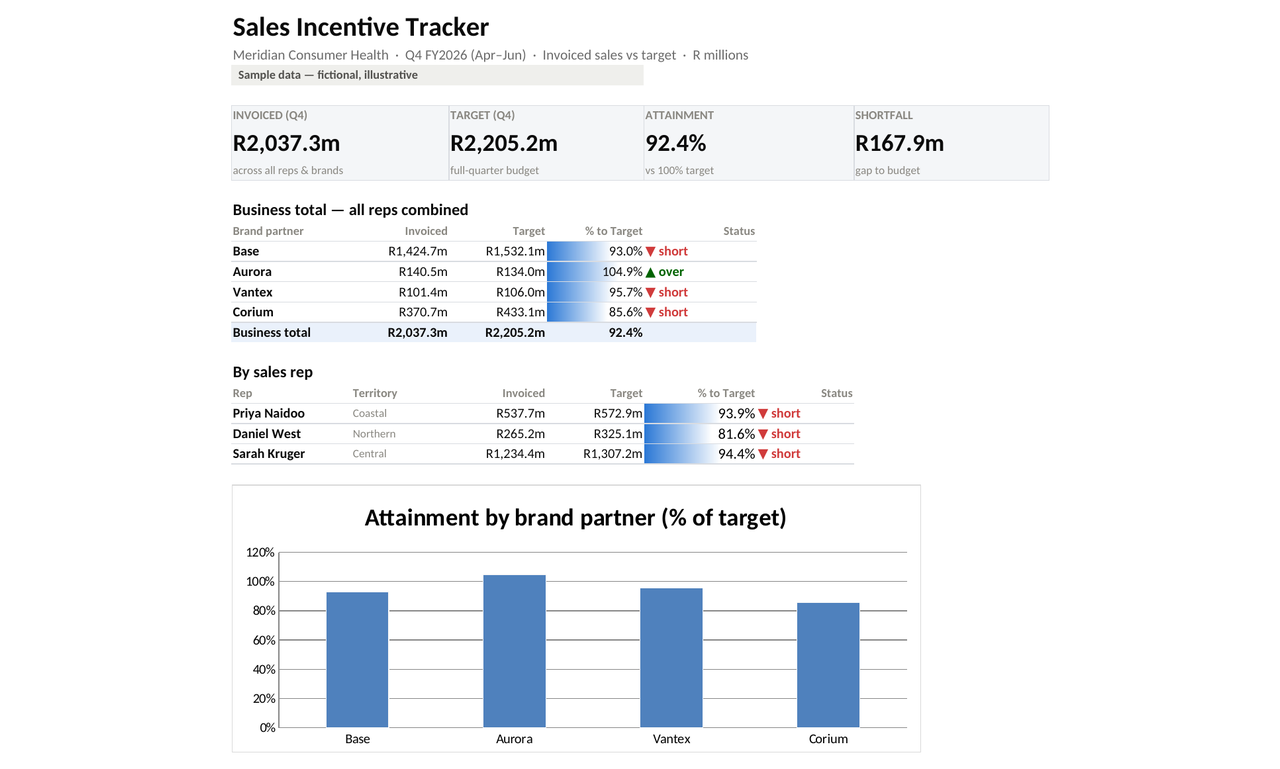
Raw sales export in, a clean self-updating dashboard out, a 35-second look at what a Workbench build does.
Yes. Power Query refreshes the whole workbook from your source files in a click, or I can run the monthly refresh for you as a service.
No. It is native Excel. No plugins, no monthly software, it works with the Excel your team already has.
That is the normal starting point. Bring the raw export exactly as it comes out of your system; the cleaning and structuring is my job, not yours.
Always. Real figures are never shown as samples, every example on this site is fictional.
Tell me what you're working with, I'll tell you the cleanest way to build it.
Start a projectThis site uses only what it needs to run. With your consent it also uses the LinkedIn Insight Tag and the Meta Pixel to measure advertising. See our Privacy & Cookies page.